
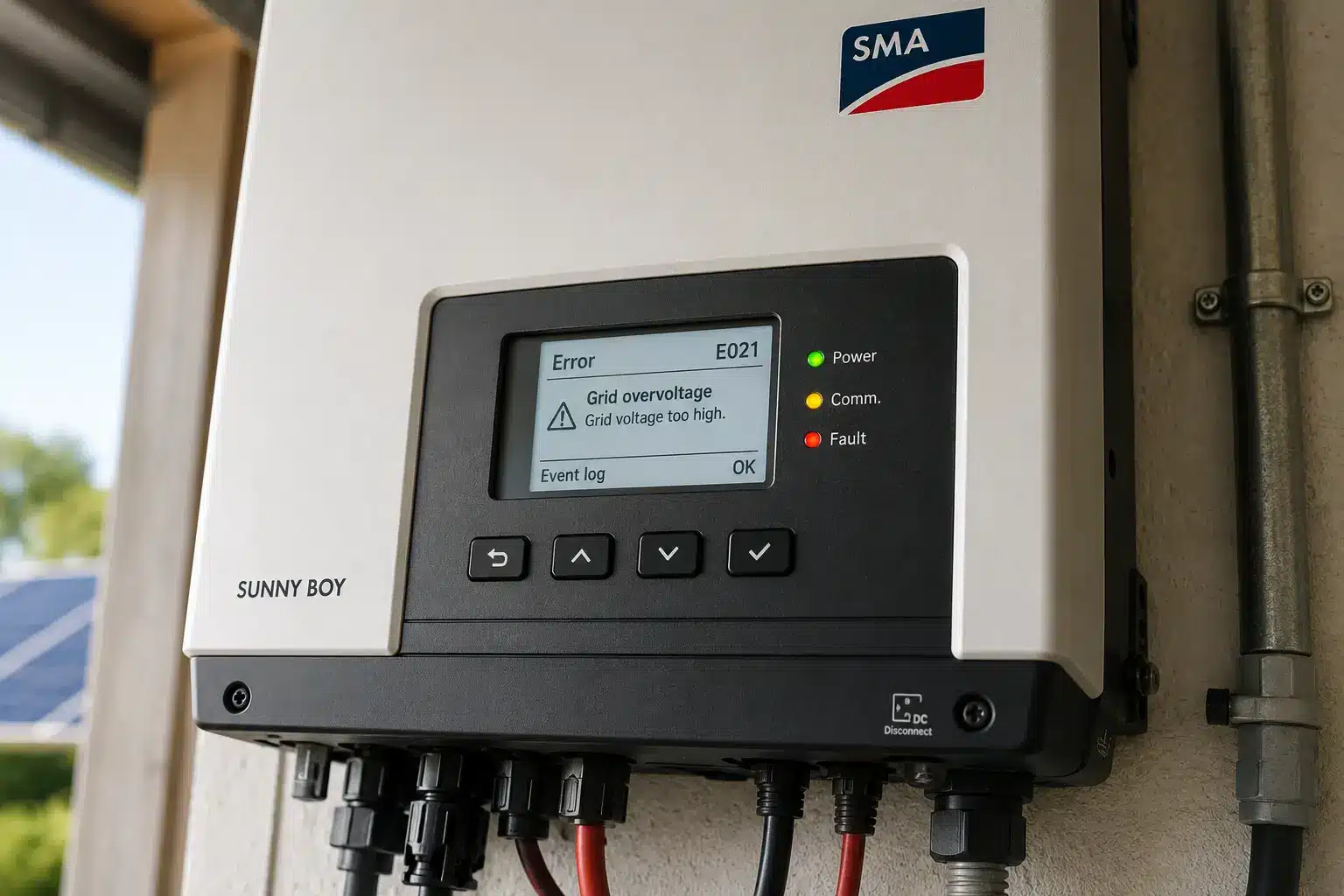
If your SMA inverter is showing an error code on its display or in the Sunny Portal, you’re likely dealing with one of dozens of event numbers that indicate specific grid, DC, or internal faults. Many SMA inverters were installed 10–15 years ago, and finding clear support information can be frustrating. This guide walks you through the most common SMA inverter error codes, what they mean, and when you can troubleshoot yourself versus when to call a technician.
How SMA inverter error codes work
SMA inverters display error codes as numbered “events” on the inverter’s LCD screen or in the Sunny Portal monitoring platform. Most SMA models show a 3- or 4-digit event number, while some older models (like the SB3-5000TL-20 and early STP8-17000TL-10 units) only display a 1- or 2-digit code on the screen. For these older units, you can retrieve the full event number through the Sunny Explorer software.
Event codes fall into several categories: grid faults (100-series and 300-series), DC-side issues (3000-series), internal device errors (6000-series and higher), and communication or configuration warnings (9000-series). Understanding which category your error falls into helps you quickly identify whether it’s a temporary grid issue, a physical system problem, or a hardware failure.
If you’re not sure where to find your event number, check the inverter display first. If the screen is blank or unresponsive, log into the Sunny Portal or use the Sunny Explorer app to check the inverter status remotely. Many errors will auto-resolve once grid or weather conditions normalize, but safety-critical faults like insulation errors will latch and prevent the inverter from restarting until the issue is repaired.
Grid monitoring faults (Event 101, 102, 103, 301)
Grid monitoring faults are the most common SMA inverter error codes, especially in areas with high solar penetration or unstable utility grids. Event 102 indicates grid overvoltage, meaning the voltage from your utility has exceeded the inverter’s permitted operating range. Event 101 signals grid undervoltage, Event 103 refers to frequency issues, and Event 301 means the 10-minute average grid voltage is out of range.
These faults occur when the inverter detects unsafe grid conditions and disconnects to comply with safety standards. In many cases, the inverter will automatically reconnect once grid voltage or frequency returns to normal. If you see these codes occasionally—especially during midday when solar production is high—it’s typically a grid-side issue, not a problem with your system.
However, if grid monitoring faults appear daily or persist for hours, contact your utility company to report voltage issues. Chronic overvoltage can indicate your local grid is oversaturated with solar exports, and the utility may need to adjust voltage regulation equipment. You can also check your inverter’s grid settings in Sunny Portal to confirm they match your region’s requirements, but do not adjust these without consulting a qualified installer or SMA support.
Insulation faults (Event 3501, 3701)
Event 3501 (insulation fault) and Event 3701 (residual current fault) are safety-critical errors that prevent your inverter from operating. These codes indicate the inverter has detected a ground fault or excessively low insulation resistance between your solar array and ground. Insulation faults can be caused by damaged cables, moisture intrusion in junction boxes, or panel defects that create a pathway for current to leak to ground.
Unlike grid faults, insulation errors will not auto-clear. The inverter will remain offline until the fault is physically repaired. On some SMA Sunny Boy models (especially the SB 3.0–6.0 and SB 7.7), insulation fault codes can latch even after the underlying problem is fixed, requiring a manual reset through Sunny Explorer or a technician visit.
To diagnose an insulation fault, a qualified technician will use a megohmmeter to test insulation resistance on each string. The test measures resistance between the positive and negative conductors, and separately from each conductor to ground. Resistance should typically exceed 1 megohm. If a string shows low resistance or a dead short to ground, the technician will isolate that string and inspect connectors, junction boxes, and panel bypass diodes for damage. Do not attempt to troubleshoot insulation faults yourself—these involve high DC voltage and require specialized test equipment.
If your original installer is no longer in business, use our directory to find a local solar service technician experienced with SMA equipment.
DC-side errors (Event 3403, 3404, 6406)
DC-side error codes indicate issues with the voltage or current coming from your solar panels. Event 3403 and 3404 both signal that DC voltage from the array is too high—either during operation (3403) or at open-circuit startup (3404). Event 6406 indicates DC overcurrent, meaning more current is flowing from the array than the inverter is rated to handle.
High DC voltage errors are often caused by system design mismatches, such as too many panels wired in series for the inverter’s input range, or cold weather conditions that temporarily boost panel voltage above the inverter’s maximum. If you see Event 3404 only on cold, clear mornings, it may resolve on its own as temperatures rise. However, if the error persists or occurs frequently, your array configuration may exceed the inverter’s specifications and will require reconfiguration by a licensed installer.
DC overcurrent faults (Event 6406) are less common and can indicate a wiring error, a short circuit in the array, or damaged panels that are backfeeding current. These errors require immediate inspection. Disconnect the DC input at the inverter and do not reconnect until a technician has verified the array wiring and tested for shorts. Ignoring DC overcurrent faults can damage the inverter and create a fire risk.
Self-consumption and battery mode issues
If your SMA inverter is paired with a battery storage system (such as the Sunny Boy Storage or Sunny Island series), you may encounter errors related to self-consumption mode, battery communication, or energy-saving mode. These faults are less common on standard grid-tied systems but can be confusing for homeowners with older hybrid setups.
Battery communication errors often appear when the inverter cannot detect the battery or when the battery management system (BMS) reports a fault. Check that all CAN bus or Modbus communication cables are securely connected, and verify that the battery firmware is up to date. SMA’s energy-saving mode can also trigger status messages if the battery enters deep discharge protection or if there’s insufficient PV power to charge the battery during the day.
Self-consumption configuration errors are usually related to incorrect settings in the Sunny Portal or inverter parameters. If your system is not switching between grid export, battery charging, and load coverage as expected, review the operating mode settings in the inverter’s web interface or Sunny Portal. For complex battery issues, consult the system integrator who installed the storage—battery troubleshooting often requires both inverter and battery manufacturer support.
Using Sunny Portal to diagnose SMA inverter errors
The Sunny Portal is SMA’s online monitoring platform, and it’s one of the best tools for diagnosing persistent inverter issues without a site visit. If your inverter is connected to the internet via Ethernet or Wi-Fi, it will upload event logs, performance data, and diagnostic information to Sunny Portal automatically.
To check error codes in Sunny Portal, log in to your account and navigate to the plant monitoring page. Under the inverter status section, you’ll see the most recent event number and message. Click “Detailed Analysis” to view historical event logs, voltage and current trends, and production comparisons across multiple days. This is especially useful for identifying patterns—such as grid faults that occur only at midday, or insulation errors that appeared after a rainstorm.
Sunny Portal also offers communication monitoring, which alerts you if the inverter stops sending data. If your inverter goes offline in Sunny Portal but the system is still producing power, the issue is likely a lost Wi-Fi or Ethernet connection, not an inverter fault. Check that your router has assigned a valid IP address to the inverter and that DHCP is enabled. Firmware updates can also be pushed remotely through Sunny Portal on newer models, which can resolve some recurring event codes.
Keep in mind that older SMA inverters may have limited Sunny Portal functionality or require a separate communication accessory (like the Sunny WebBox) to connect. If you’re struggling to access monitoring data on a system installed before 2015, the inverter may not support modern cloud connectivity.
Internal hardware faults (Event 6400-series, 8800-series)
Event codes in the 6400-series and higher typically indicate internal hardware failures, such as sensor errors, failed self-tests, or component overheating. Event 6501 (internal overtemperature) is one of the most common and can be caused by inadequate ventilation, direct sunlight exposure, or an internal component fault. Event 6447 (inverter bridge self-test failure) and Event 6443 (digital signal processor error) are more serious and usually require inverter replacement or factory repair.
If your inverter shows an overtemperature fault, first check its installation location. SMA inverters should be mounted in a shaded, well-ventilated area with clearance on all sides. If the inverter is installed in direct sun or inside a hot garage, it may be thermally shutting down to protect itself. Cleaning dust and debris from the cooling vents can also help, but if the inverter continues to overheat in normal conditions, an internal component may have failed.
For fatal hardware errors—especially on inverters that are 10+ years old—replacement is often the most cost-effective option. SMA no longer manufactures many older Sunny Boy and Sunny Tripower models, but the company will provide a compatible replacement unit under warranty or extended warranty coverage. If your inverter is out of warranty, you’ll need to purchase a new unit. Fortunately, modern SMA inverters are backward-compatible with older array configurations in most cases.
Check your inverter’s warranty status in the SMA Online Service Center. SMA offers a standard 5-year factory warranty on most models, with optional extended coverage up to 10, 15, or 20 years. If your inverter was registered within 12 months of commissioning (or 30 days for battery systems), you may qualify for SMA’s free +5-year warranty extension.
When to call SMA support versus a local technician
Knowing when to call SMA directly versus hiring a local solar service technician can save you time and money. For warranty claims, firmware issues, or questions about event code meanings, contact SMA’s service line or open a ticket in the SMA Online Service Center. SMA support can remotely diagnose many issues, push firmware updates, and authorize warranty replacements that ship within 48 hours.
For physical repairs—such as insulation faults, wiring issues, or array problems—you’ll need a licensed electrician or solar installer to visit your site. SMA does not dispatch technicians for on-site service, so you’ll need to find a qualified local installer who can troubleshoot and repair the system. Many installers are familiar with SMA equipment even if they didn’t install your original system, especially for common models like the Sunny Boy and Sunny Tripower series.
If your original installer is no longer in business—a common issue for systems installed in the early 2010s—don’t panic. SMA inverters are widely supported, and any competent solar service provider can diagnose and repair most faults. Bring your event code number and any screenshots from Sunny Portal when you contact a technician, as this will help them prepare the right tools and parts for the service call.
Frequently Asked Questions
Final Thoughts
SMA inverters are known for their reliability and longevity, but like any piece of equipment, they can encounter faults over time—especially as systems age past the 10-year mark. The good news is that SMA’s event code system is detailed and well-documented, making it easier to identify the root cause of an issue compared to many other inverter brands.
If you’re dealing with a recurring error code, don’t ignore it. Many faults—especially grid monitoring issues and insulation errors—are early warnings of problems that can worsen if left unaddressed. Use the Sunny Portal to track trends, and reach out to SMA support or a local technician for help diagnosing and repairing the issue. Even if your original installer is no longer around, qualified solar service providers can work on SMA equipment and help keep your system running smoothly.
At EnergyScout, we’re here to help you find trusted local installers who can service your system, no matter how old it is. If you’re struggling to get support for an aging SMA inverter, use our directory to connect with experienced technicians in your area.