
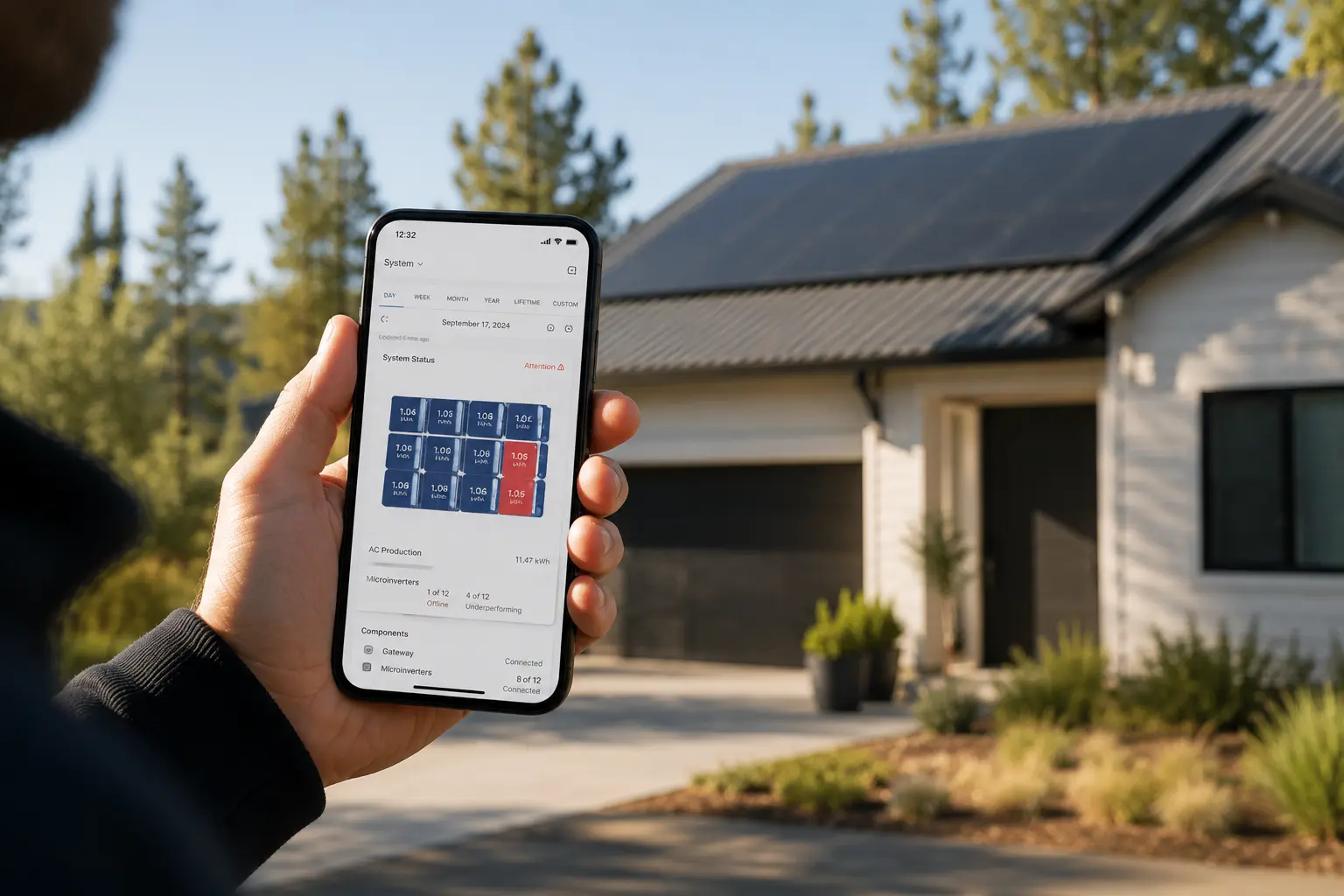
Seeing an Enphase microinverter error code in your Enlighten app can be unsettling—especially when your monitoring shows a panel or two has stopped reporting. The good news: most Enphase alerts don’t mean your system has failed. Many are temporary communication issues or grid safety responses that resolve themselves once conditions normalize.
How Enphase error codes work differently than string inverter systems
Unlike string inverters where one fault can take down your entire array, Enphase microinverter systems are designed with redundancy built in. Each panel has its own microinverter converting DC power to AC independently. If one microinverter goes offline, the rest of your system continues producing.
This design means an error code on one or two panels doesn’t stop your solar production—it just reduces it proportionally. A system with 20 panels losing one microinverter still operates at 95% capacity. The Enphase Enlighten app shows panel-level detail, so you can see exactly which unit is affected and track production for every microinverter in real time.
Most error codes fall into four categories: internet connectivity issues (Gateway Not Reporting), microinverter communication problems (Microinverter Not Reporting), production performance alerts (low output or underperformance), and grid condition responses (voltage or frequency events). Understanding which category your alert falls into helps you determine whether you need immediate action or can wait and monitor.
Gateway Not Reporting vs. Microinverter Not Reporting
These are the two most common alerts Enphase owners see, and they mean very different things.
Gateway Not Reporting means your Envoy or IQ Gateway has lost its internet connection. Your system is likely still producing solar power, but data isn’t reaching the Enphase cloud servers. You won’t see updated production numbers in the app until the connection is restored. Check your home Wi-Fi, router status, and whether other devices can connect. If your internet is working elsewhere, try power cycling the gateway by unplugging it for 30 seconds and plugging it back in.
Microinverter Not Reporting means one or more microinverters have stopped sending data to the gateway over the power line communication (PLC) network. This could be a temporary communication glitch, a tripped breaker on an AC branch circuit, or—less commonly—a failed microinverter. In the Enlighten app’s Array view, affected panels appear black or gray. Tap on the panel to see when it last reported data. If it’s been offline for more than a few hours during daylight, it’s worth investigating further.
If multiple panels on the same roof section stop simultaneously, check your electrical panel for a tripped solar breaker. Enphase microinverters are wired in groups on 20-amp branch circuits—if the breaker trips, every microinverter on that circuit loses power and stops reporting.
How to identify which microinverter is failing in the Enlighten app
The Enlighten app and web portal give you panel-level visibility. Here’s how to pinpoint the problem unit:
Log into the Enlighten app or visit enlighten.enphaseenergy.com. Navigate to the Array tab or system map view. Panels producing normally show in color (green, yellow, or blue depending on output). Panels with errors appear gray, black, or red.
Tap on the affected panel. You’ll see the microinverter serial number, last report time, current status, and recent production history. If the panel last reported hours or days ago and shows zero production during daylight hours, that microinverter isn’t communicating.
Check neighboring panels. If panels around the problem unit are producing normally, it’s likely an issue isolated to that one microinverter or its wiring connection. If an entire row or section is offline, suspect a tripped breaker or PLC communication issue affecting that branch circuit.
Cross-reference the serial number visible in the app with the physical labels on your roof (if accessible). Installers typically create an array map during installation showing microinverter serial numbers and panel positions. If you don’t have this documentation and need a professional to service the system, find a certified Enphase installer who can locate and replace the unit under warranty.
Common Enphase error codes and what they mean
Enphase uses descriptive status codes rather than cryptic numeric codes. Here are the most common ones homeowners encounter:
AC Voltage Out of Range (ACVOOR): The microinverter detected grid voltage outside safe operating limits—typically too high or too low. This is a safety feature, not a malfunction. The microinverter shuts down temporarily to protect itself and your home’s electrical system. It will resume automatically once grid voltage returns to normal range (typically 211-264V for 240V systems). If this code appears frequently, contact your utility—it may indicate a grid supply issue in your area.
AC Frequency Out of Range (ACFOOR): Grid frequency has drifted outside the 59.3-60.5 Hz range (for 60 Hz grids in North America). Like ACVOOR, this is a grid protection response. The microinverter reconnects automatically when frequency stabilizes. Persistent frequency errors suggest a utility grid problem.
Grid Gone: The microinverter has lost AC connection to the grid. This happens during utility outages or if the AC disconnect is turned off. Standard grid-tied Enphase systems (without IQ8 battery backup) shut down during outages as required by code. Production resumes automatically when grid power returns.
DC Too Low: The solar panel isn’t generating enough DC voltage for the microinverter to operate. Common causes include nighttime, heavy shading, snow coverage, or a disconnected panel. If this appears during peak sun hours on a clear day, check the DC connection between the panel and microinverter.
DC Too High: Panel voltage exceeds the microinverter’s maximum input rating. This can happen if a panel with too high an open-circuit voltage (Voc) was paired with an incompatible microinverter model. Verify the panel’s Voc specification matches the microinverter’s maximum DC input voltage. IQ7 and IQ8 models have different voltage tolerances.
Over Temperature / Critical Temperature: The microinverter has exceeded its safe operating temperature and temporarily reduced output or shut down to cool. This can occur on hot days with inadequate airflow beneath the panel, especially on low-slope or flat roofs. The microinverter resumes normal operation once temperature drops. If this happens frequently, check that panels have proper clearance for ventilation.
Troubleshooting microinverter communication loss
When one or more microinverters stop reporting, start with these steps before calling for service:
Check the Envoy/Gateway status. If the gateway itself is offline, no microinverters will report. Verify the gateway shows a solid green network LED and is connected to your home Wi-Fi. Gateway offline issues are connectivity problems, not microinverter failures.
Power cycle the gateway. Unplug the Envoy or IQ Gateway, wait 30 seconds, then plug it back in. If your gateway is integrated into an IQ Combiner box mounted on your exterior wall, flip the dedicated breaker off and back on instead. Never open the combiner box yourself—it contains live electrical connections.
Initiate a device scan. In the Enlighten app, go to Menu > System > Devices and pull down to refresh. Some gateways have a physical Device Communications button—press and hold for 5 seconds until the LED flashes green. This forces the gateway to re-scan for microinverters on the PLC network.
Check for tripped breakers. Locate your main electrical panel and look for any tripped solar breakers. Enphase systems typically have one or more 20-amp breakers labeled for solar. If a breaker has tripped, reset it. If it trips again immediately, there’s likely a wiring fault that requires a licensed electrician.
Wait for weather to clear. Heavy snow, ice accumulation, or severe storms can temporarily disrupt power line communication between microinverters and the gateway. If your area recently experienced a nor’easter or ice storm and panels aren’t accessible, wait 24-48 hours. Communication often resumes once snow melts or ice clears.
If a microinverter remains offline for more than 48 hours during clear weather and daylight, it may have failed. Enphase IQ7 and IQ8 microinverters carry a 25-year warranty. Your installer going out of business doesn’t void coverage—the warranty stays with the equipment. Contact Enphase support or find a local certified installer to process a warranty claim and replace the unit at no cost.
Production alerts and underperformance codes
Enlighten may send notifications that your system is producing below expected output. These aren’t always hardware failures—they’re often environmental or temporary conditions.
Check for shading. Even partial shade from a tree branch, chimney, or new construction nearby can significantly reduce a panel’s output. Compare the affected panel’s production graph to its neighbors. If one panel consistently underperforms while others on the same roof plane produce normally, shading or soiling is likely.
Look for debris or soiling. Bird droppings, leaves, dust, or pollen can block sunlight. A single heavy deposit on one panel can trigger an underperformance alert. Most solar panels are self-cleaning in rainy climates, but dry regions may need occasional manual cleaning.
Compare to historical baselines. Enlighten shows daily, monthly, and yearly production trends. A gradual decline over years may indicate normal panel degradation (typically 0.5% per year). A sudden drop suggests a specific event—shading change, new obstruction, or equipment issue.
If production is down across the entire array—not just one or two panels—consider seasonal factors. Winter sun angles, shorter days, and cloud cover reduce output compared to summer. If production is low system-wide during clear weather with no obvious cause, read our guide on how solar performs in winter and cloudy conditions.
When to call for professional service
Some issues require a certified technician. Here’s when DIY troubleshooting isn’t enough:
A microinverter has been offline for more than 48 hours during daylight and clear weather, despite power cycling the gateway and checking breakers. The unit may have failed and needs warranty replacement.
Multiple microinverters on different branch circuits stop reporting simultaneously with no obvious cause. This could indicate a deeper communication or wiring issue that requires diagnostic equipment.
You see repeated ACVOOR or ACFOOR codes across many or all microinverters. Persistent grid voltage or frequency problems should be reported to your utility company, and an electrician may need to verify your home’s electrical system is within spec.
A specific error code appears that you can’t identify in Enphase documentation or this guide. Firmware updates occasionally introduce new status codes. Enphase support or a certified installer can interpret them.
Your installer went out of business and you need warranty service. Enphase warranties run with the equipment, not the installer. You can contact Enphase directly or find a new certified installer in your area to process the claim. Learn more in our guide on what to do when your solar installer goes out of business.
Never attempt to replace a microinverter yourself. The units are hardwired to live AC circuits and mounted under solar panels on your roof. Microinverter replacement requires an electrician or certified solar technician with proper safety training and equipment.
Frequently Asked Questions
Final Thoughts
Enphase error codes can look intimidating at first, but they’re actually one of the system’s strengths. Panel-level monitoring means you get detailed alerts that pinpoint exactly where an issue is—something string inverter owners don’t have. Most alerts are temporary, many resolve on their own, and the modular design means a single failed component doesn’t take your whole system offline.
If you’re seeing recurring errors or a microinverter that won’t come back online, don’t let it sit. Even one underperforming panel adds up over months and years. Enphase’s 25-year warranty is one of the best in the industry, and replacement units are typically available quickly through certified installers.
At EnergyScout, we believe you should understand what’s happening with your system—not just wait for someone to tell you what’s wrong. If you need help finding a qualified local technician who works with Enphase systems, start here. And if you’re considering solar or wondering whether microinverters are the right choice for your home, our guide to how solar panels work explains the differences between inverter types and what to expect from modern systems.